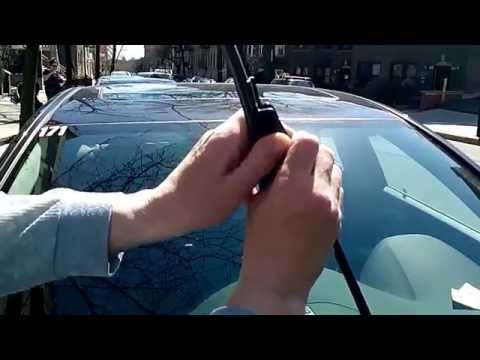
Quick answer: Wiper Blade Replacement on a 2021–2023 Buick Envision is rated Easy and takes about 10–15 minutes. Parts cost about $81. This guide walks you through the full job step by step, including the mistakes to avoid.
| Part Name |
Part Number |
Price |
Buy |
| Driver wiper blade, 24" |
Bosch 24A |
$32.99 |
|
| Passenger wiper blade, 20" |
Bosch 20B |
$32.99 |
|
| Rear wiper blade, 11" |
— |
$14.99 |
|
About prices: shown prices are typical retail averages and change frequently; cheaper alternatives may be available. Confirm the current price before buying.
💡 Pro tip: Order all parts at once to save on shipping
Step-by-Step Instructions
Follow these steps carefully
1
Confirm the sizes and buy the blades
The 2021–2023 Buick Envision takes a 24-inch blade on the driver side, a 20-inch blade on the passenger side, and an 11-inch blade on the rear window. Buy all three blades before you start.
2
Raise the arms — check for a service position
Switch the ignition off and try lifting a wiper arm off the glass. The Envision's wipers park low near the hood line; if the arms tuck under the hood edge and cannot be lifted clear, the car has a wiper service mode in the infotainment menu (check Settings > Vehicle in your owner's manual) — enable it before forcing anything. Never pry an arm up against the hood edge.
🔧 Mechanic's note — Tom Becker
I keep a mental note on this one: Never pry an arm up against the hood edge. Your wallet will thank you.
3
Release the old blade from the J-hook arm
Press the tab and slide the blade downward out of the hook. Support the bare arm with your free hand once the blade is off — do not let it snap back onto the windshield.
🔧 Mechanic's note — Tom Becker
I've watched people get this wrong: Support the bare arm with your free hand once the blade is off — do not let it snap back onto the windshield.
4
Prep the new 24-inch blade
Pull the protective sleeve off the new blade without touching the rubber wiping edge. Lay the new 24-inch blade next to the old one to verify the length — the 24 and 20 boxes are easy to confuse on the shelf.
5
Install the new blade and check the lock
Slide the new 24-inch blade up into the J-hook until the connector's tab clicks over the hook. Pull the blade firmly along the arm to confirm the lock — it must not slide or rock. Lower the arm gently back onto the windshield by hand.
6
Do the passenger side and the 11-inch rear blade
Repeat the tab-release and install for the 20-inch passenger blade, verifying the 24 is on the driver side. Then lift the rear arm off the liftgate glass, release the old 11-inch blade from its rear connector, and click the new one on the same way.
7
Exit service mode and test with washer fluid
If you used a service position, switch the ignition on and run the wipers once so the arms return to their normal park. On the rear, run the rear washer and wiper and confirm the 11-inch blade clears its arc cleanly.
All Done!
Test your repair before closing everything up. If something doesn't work right, double-check your steps.
⚠️ Common Mistakes to Avoid
- • Buying 2016–2020 Envision sizes (24/18/12) — the 2021+ second generation changed all three lengths
- • Forcing the arms up from under the hood edge instead of using the service mode
- • Mixing up the 24-inch and 20-inch front blades
- • Forgetting the 11-inch rear blade on the liftgate