Quick answer: Wiper Blade Replacement on a 2004–2009 Nissan Titan is rated Easy and takes about 10–15 minutes. Parts cost about $66. This guide walks you through the full job step by step, including the mistakes to avoid.
| Part Name |
Part Number |
Price |
Buy |
| Driver wiper blade, 24" |
Bosch 24A |
$32.99 |
|
| Passenger wiper blade, 22" |
Bosch 22B |
$32.99 |
|
About prices: shown prices are typical retail averages and change frequently; cheaper alternatives may be available. Confirm the current price before buying.
💡 Pro tip: Order all parts at once to save on shipping
Step-by-Step Instructions
Follow these steps carefully
1
Confirm the sizes and buy the blades
The 2004–2009 Nissan Titan takes a 24-inch blade on the driver side and a 22-inch blade on the passenger side — the same for every model year in this range. Buy blades with a 9x3 J-hook connector, which matches the Titan's arms.
2
Lift both arms off the windshield
The Titan needs no wiper service or maintenance position — the blades park on the glass with clear access. Pull the driver-side arm straight up off the windshield until it holds itself up, then do the same on the passenger side.
3
Release the old blade from the J-hook arm
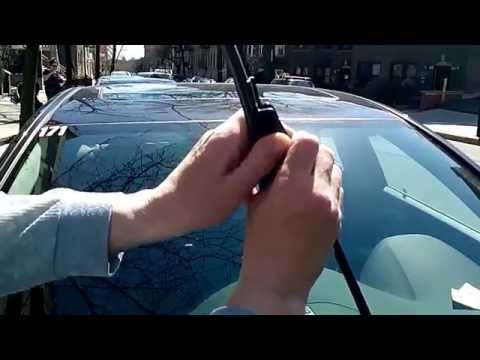
Press the tab and slide the blade downward out of the hook's curve. If it is stuck from years of weather, wiggle it along the arm's axis — never twist sideways, which can bend the arm. Hold the bare arm once the blade is off.
🔧 Mechanic's note — Tom Becker
Quick word from me — I've been under there: If it is stuck from years of weather, wiggle it along the arm's axis — never twist sideways, which can bend the arm.
4
Prep the new 24-inch blade
Open the new 24-inch blade and pull off the plastic protector from the rubber edge — this is the most overlooked step in any wiper swap. Compare it end to end with the old blade to confirm the 24-inch length. Check that the 9x3 J-hook adapter is pre-fitted and snapped firmly into the blade's center socket.
🔧 Mechanic's note — Ray Delgado
I've seen this exact mistake come through the shop: Check that the 9x3 J-hook adapter is pre-fitted and snapped firmly into the blade's center socket.
5
Install the new blade and check the lock
Slide the new 24-inch blade up into the J-hook until the locking tab snaps over the hook with an audible click. Tug the blade firmly along the arm — there should be zero sliding or rocking. An unlocked blade on the Titan's big windshield will walk off at highway speed, so do not lower the arm until the tug test passes.
🔧 Mechanic's note — Tom Becker
I've found that small thing, big difference: An unlocked blade on the Titan's big windshield will walk off at highway speed, so do not lower the arm until the tug test passes.
6
Do the passenger side with the 22-inch blade
The 2-inch difference is easy to mix up — verify before installing, since a 24 on the passenger side will overhang and clash. Tug-test the passenger blade the same way, then lower its arm carefully.
7
Test both blades with washer fluid
Start the truck and run the wipers through a full sweep, watching for missed bands, chatter, or the blades clashing near the center. Pull the stalk to spray washer fluid and confirm the 24-inch driver blade and 22-inch passenger blade clear wide, quiet, streak-free paths.
All Done!
Test your repair before closing everything up. If something doesn't work right, double-check your steps.
⚠️ Common Mistakes to Avoid
- • Buying two 24-inch blades — the passenger side takes the 22-inch blade
- • Twisting a stuck blade sideways instead of wiggling it along the arm's axis, which bends the arm
- • Leaving the plastic protector strip on the new blade's rubber edge
- • Assuming the pickup has a rear wiper to replace — it does not